How do I
configure Microsoft Outlook Express?
Please follow these steps:
- Select Accounts... from the Tools
pull-down menu.

- You will see a listing of all the different
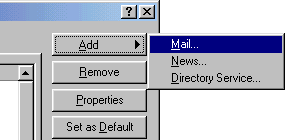
accounts that you have Outlook Express configured to use. Click on Add...
and select Mail... to add a new email account.
- From here out you will be guided by the
Account Wizard. We won't cover each of the steps in our instructions, but the
important information is below:
| E-mail address: |
something@yourdomain.com |
| Type of mail server: |
POP3 |
| Incoming Mail: |
mail.yourdomain.com |
| Outgoing Mail: |
mail.yourdomain.com |
| POP account name: |
your user name@yourdomain.com |
| Password: |
your password |