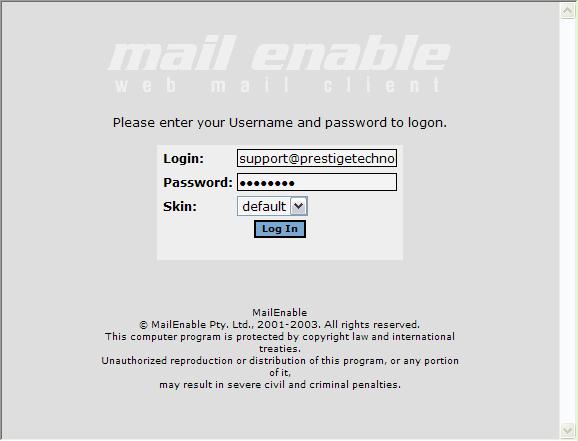
How do I
view my mail through the web interface?
Through you web interface (Internet Explorer, Netscape, etc.) in the url
area type
http://mail.prestigetechnologies.com/mewebmail . You can also check your
mail from your domain.
http://mail.yourdomain.com/mewebmail
If you have just signed up for your new account you may not be able to use your domain ( http://mail.yourdomain.com/mewebmail ) until DNS propagates, which usually takes up to72 hrs.
Remember under Login to put your full login name in as shown above. ex. support@prestigetechnologies.com
Choose Login
Once inside your webmail interface choose the Options Tab located on the top of your webmail window.
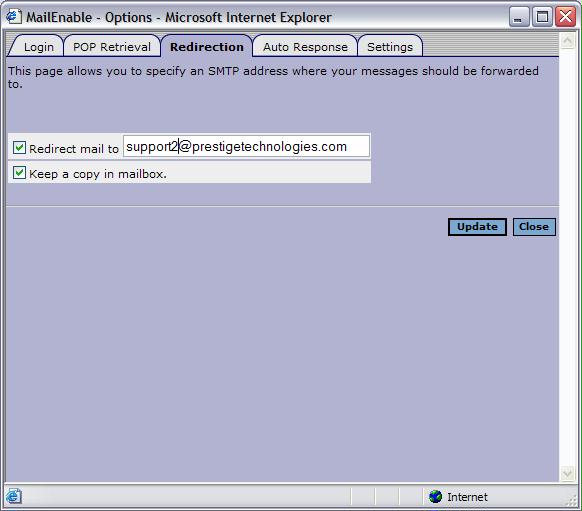
Choose the Redirection tab. Check Redirect mail to, and then type in the address you would like your mail to be redirected to.
If you would like keep a copy of the email in your mailbox before sending it check off " Keep a copy in mailbox"
Choose Update
You're finished.